


High-growth SaaS websites live on momentum. A buyer lands on a product page, checks pricing, opens a demo request, starts a free trial, and expects every click to respond immediately. When that flow feels slow or unstable, interest drops fast.
Core Web Vitals give product and marketing teams a clear way to measure that experience. Google centers these metrics on three signals: Largest Contentful Paint (LCP), Interaction to Next Paint (INP), and Cumulative Layout Shift (CLS). Together, they reflect loading performance, interactivity, and visual stability in real-world use, not just lab tests.
For SaaS companies, that framing matters because modern sites are rarely simple brochure pages. They include JavaScript-heavy front ends, pricing calculators, signup forms, live chat, analytics tags, personalization, and embedded product previews. A site can look polished and still feel frustrating.
What Core Web Vitals measure on SaaS websites
According to Google Search Central, Core Web Vitals are designed to assess real-world user experience. That wording matters. A page is not judged only by how it performs on a developer laptop with strong Wi-Fi. It is judged by what users actually experience across devices, networks, and sessions.
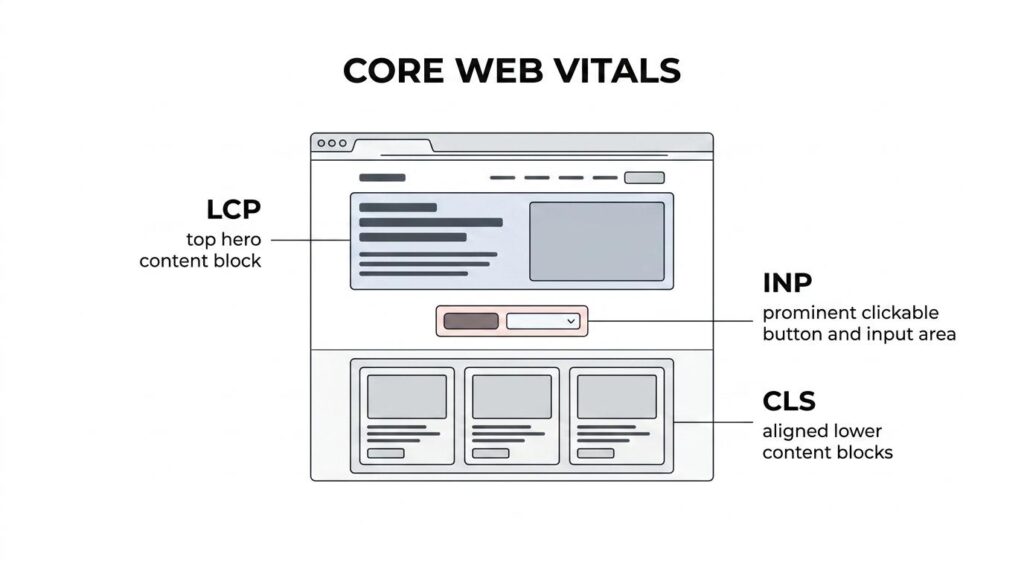
For high-growth SaaS brands, that makes Core Web Vitals a business metric as much as a technical one. These signals affect how quickly a visitor sees value, how confidently they interact with a page, and whether the interface stays steady long enough to complete a task.
| Metric | What it measures | Good threshold |
|---|---|---|
| LCP | How quickly the largest visible content element appears | 2.5 seconds or less |
| INP | How quickly the page responds after a user interaction | 200 milliseconds or less |
| CLS | How much unexpected layout movement happens while the page renders | 0.1 or less |
Those targets come from Google’s published guidance and are evaluated at the 75th percentile of page views. That means performance needs to be consistently good for most users, not just the fastest visits.
Why Core Web Vitals matter for SaaS growth and conversions
Core Web Vitals influence more than SEO reporting dashboards. Google states that they are used by its ranking systems and sit within broader page experience evaluation. That does not mean a perfect score guarantees top rankings. It does mean poor experience can create drag where a SaaS business wants lift.
The bigger impact is often closer to revenue. When LCP is slow, visitors wait too long to see the message that explains the product. When INP is weak, forms, tabs, filters, and CTAs feel sticky. When CLS is high, users misclick, lose trust, or abandon the page. On a SaaS funnel, those moments stack up.
That gap shows up across the full buying path.
- Product landing pages
- Pricing and comparison views
- Demo request forms
- Free trial signup flows
- In-app onboarding screens
A team chasing paid acquisition efficiency, stronger branded search visibility, and better trial conversion should treat Core Web Vitals as a growth system issue, not a narrow front-end task.
How Google evaluates Core Web Vitals with the 75th percentile
One of the most misunderstood parts of Core Web Vitals is how scoring works. Teams often celebrate a strong Lighthouse score and assume the site is healthy. That can help, but Google’s Core Web Vitals framework emphasizes field data, which reflects real user sessions over time.
Web.dev explains that page-level classification uses the 75th percentile of page views for each metric. In plain terms, a page needs to perform well for most users, not only the median visit. If a meaningful share of traffic comes from slower phones, weak connections, or ad-heavy entry pages, those visits count.
There is another important detail: a page needs to pass all three metrics to earn a good Core Web Vitals assessment. Strong INP alone does not offset weak LCP. Good loading does not cancel out layout instability.
- 75th percentile: Performance is judged by how the slower portion of normal visits behaves, not by best-case conditions.
- All-metrics requirement: A page needs good LCP, good INP, and good CLS to count as passing.
- Ranking context: Core Web Vitals are part of page experience and part of Google’s ranking systems, not a standalone ranking shortcut.
Industry data shows why this combined view matters. The HTTP Archive Web Almanac 2025 reported that 74% of desktop pages had good LCP, 97% had good INP, yet only 56% achieved good overall Core Web Vitals. That spread is telling. A site can pass one or two metrics easily and still miss the full standard.
Fast interaction is now expected. Stable, consistently quick page experience across the whole funnel is where many sites still fall short.
Common Core Web Vitals issues on JavaScript-heavy SaaS stacks
SaaS websites tend to create their own performance problems. Product teams want rich experiences. Marketing teams want testing tools and personalization. Sales wants schedulers, chat, and tracking. None of that is unreasonable, yet every addition has a cost.
The common pattern is easy to recognize: a homepage with a large hero video, a React-powered pricing calculator, several third-party scripts, a chat widget, event tracking, a consent banner, and animation libraries. Any one tool may seem harmless. Together, they can slow rendering, block the main thread, or shift visible content.
The most frequent issues usually look like this:
- Heavy hero images or autoplay video above the fold
- Render-blocking CSS and JavaScript
- Large client-side hydration costs
- Third-party tag overload
- Layout shifts from late-loading fonts, banners, or embeds
- Long tasks that delay click responses
Many SaaS teams focus first on page load and forget interactivity. That was easier to justify in the past. It is not enough now. INP put a spotlight on how quickly a page reacts after the user taps, clicks, or types.
How to improve Largest Contentful Paint on SaaS landing pages
LCP is often the clearest starting point because it affects first impression and message delivery. On SaaS pages, the LCP element is frequently a hero image, headline block, or featured screenshot. If that element arrives late, the value proposition arrives late too.
The first step is identifying what the LCP element actually is on your highest-traffic templates. Teams sometimes optimize everything except the element users are waiting on. Once it is identified, reduce the work required to render it. Compress and properly size hero media. Prioritize above-the-fold assets. Cut unused CSS. Reduce server response time. If the page depends on client-side rendering before the main content appears, consider server-side or static rendering for marketing pages.
A fast LCP tends to come from disciplined choices, not magic tools.
- Media optimization: Serve modern image formats, responsive sizes, and avoid oversized hero assets.
- Rendering strategy: Pre-render or server-render content that carries the main message.
- Resource priority: Preload key fonts and hero media when justified, while removing low-value early requests.
- JavaScript control: Trim scripts that delay the browser from painting the primary content.
For SaaS marketing sites built in modern frameworks, LCP gains often come from revisiting architecture as much as asset weight. A page can score better without losing design quality. It just needs smarter priority.
How to improve Interaction to Next Paint in product interfaces
INP measures how quickly a page responds after a user interaction. This is where many polished SaaS experiences still feel rough. A user clicks a tab and nothing seems to happen. They tap a pricing toggle and wait. They submit a form and the button stalls.
Those delays are usually tied to main-thread congestion. Too much JavaScript executes at once. Large hydration work runs before the page is truly usable. Event handlers trigger expensive rendering paths. Third-party scripts compete for attention when the user is trying to act.
Improving INP means making interaction cheap. Break up long tasks. Defer non-essential JavaScript. Reduce component re-renders. Avoid loading every feature on first paint when only a fraction is visible. If a page includes dashboards, filters, charts, or usage calculators, lazy loading and code splitting can make a dramatic difference.
This is also where product and engineering teams need a shared lens. A button that looks ready but cannot respond quickly is not a design success. It is friction with branding on top.
How to improve Cumulative Layout Shift across signup and pricing flows
CLS is about stability. Users should not have to chase moving content. On SaaS websites, layout shifts show up in banners, pricing tables, embedded calendars, live chat widgets, cookie prompts, and late-loading social proof blocks.
A common example is the signup page that loads a clean form, then pushes it down when validation messages, promotional banners, or trust badges appear. Another is a pricing page where annual and monthly plans shift card heights just as the visitor is about to click. These are small moments, yet they cut confidence.
The fix is usually structural. Reserve space for dynamic components. Set width and height for images and embeds. Avoid injecting content above existing content unless the shift is user-triggered and expected. Load web fonts in ways that limit reflow. Treat stability as a design requirement, not an afterthought.
How to measure Core Web Vitals with Search Console and field data
Good optimization work starts with the right data source. For Core Web Vitals, that means field data first. Google Search Console’s Core Web Vitals report helps teams spot page groups with poor or needs-improvement status. It is especially useful for finding patterns across templates, not just isolated URLs.
Search Console should be paired with real-user monitoring and targeted lab analysis. Field data tells you what users experienced. Lab tools help you inspect why it happened. Both matter, yet they serve different jobs. When teams blur them together, priorities get muddy.
A simple operating rhythm works well:
- Review Search Console page groups weekly
- Track template-level field metrics
- Reproduce issues in lab tools
- Fix the highest-traffic and highest-intent pages first
- Recheck after deployment, then monitor again
High-growth SaaS teams benefit from treating this as a recurring product discipline. A site launch, redesign, experimentation program, or new tag rollout can change Core Web Vitals quickly. Performance work is not a one-time cleanup. It belongs in QA, release planning, and design review.
The upside is practical. When pages load promptly, respond immediately, and stay visually steady, the site feels more trustworthy. That trust supports search visibility, conversion, and product perception all at once. For SaaS companies competing in crowded categories, that is a strong advantage to build into every release.